Lab - Storage Configuration

Overview

In this lab we will use Prism to perform a basic container setup.

Prism Element Storage Configuration Items

Configure Storage Containers

Containers are software-defined, logical constructs for managing storage policy that greatly simplify storage management. Containers are similar to datastores in ESXi.

Let’s use Prism Element to perform a basic container setup.

In Prism > Storage, click Storage, click Table, then click + Storage Container.

Use the following specifications (with Advance Settings), and click Save:

  • Name - container-initials
  • Advertised Capacity - 5 GiB
  • Compression - Enabled (inline 0 mins)
  • Deduplication - Cache Only
  • Erasure Coding - Disabled
../_images/storage_config_01.png

You can create multiple containers with different policies.

Note

Containers do not reserve any actual disk space—they are policies with a soft limit that trigger alerts but do not stop new data from being written to the container.

Explore the configuration basics further.

Go back to the container you created above and edit it to add another 10 GiB to the advertised capacity. While you’re in that window, what is the redundancy factor for the container you created in the first task?

../_images/storage_config_02.png

Redundancy Factor (RF)

We have discussed how Nutanix clusters handle data: reads, writes, CVM auto-pathing, data locality, intelligent tiering, and seamless VM migrations. While leveraging these features and capabilities, Nutanix clusters continuously monitor and handle data placement in order to optimize performance and allow clusters to maintain high availability during software upgrades and failures.

You can locate the redundancy level of containers and the cluster within Prism.

../_images/storage_config_03.png

Block awareness, introduced in 4.0, allows the cluster to survive a full 2RU block failure without using any more disk space.The basic requirement for rack/block fault tolerance is to have minimum 3 blocks in the cluster as we need to store 3 copies of metadata. Starting in AOS 5.8, block awareness is supported in conjunction with erasure coding.

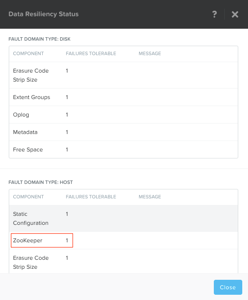
In Prism > Home, click the green OK in the Data Resiliency Status box. This opens the Data Resiliency Status window.

The picture above shows the Data Resiliency Status window, where you can see, for example, how many ZooKeeper node failures can be tolerated without impacting the cluster. Each service listed has a specific function in the cluster. Zookeeper nodes maintain the configuration of the cluster.

The RF of a cluster in Prism Element could be configured by clicking Redundancy State in the Gear menu.

Note

For this exercise, please leave the redundancy factor configured as 2.

In Prism > , click Redundancy State.

Takeaways

  • The default cluster redundancy factor is set to 2. Clusters with a redundancy factor of 2 have 1/2 of the total usable space (30 TB = 15 TB usable space) because there are two copies of the data kept.
  • A ZooKeeper failures tolerable of 1 means that one component in the cluster (one CVM, one NIC, one disk, and so on) can be down without impacting data resiliency. A failures tolerable of 2 means two components in the cluster can be down without impacting data resiliency. The two components can be different types.