Flow: Quarantine VM

Overview

Note

Estimated time to complete: 15-30 MINUTES

In this task we will place a VM into quarantine and observe the behavior of the VM. We will also inspect the configurable options inside the quarantine policy.

Quarantine a VM and Explore the Quarantine Policy

Confirm Communication between flow-abc-1 and flow-abc-2

Log on to the Prism Central environment and navigate to Explore > VMs.

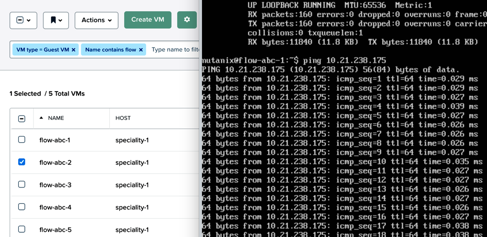
Open the VM console of flow-abc-1 and flow-abc-2 by selecting one VM at a time and clicking on the checkbox next to it.

Click Actions > Launch Console.

../_images/quarantine_pings.png

Log into both VMs with the following user credentials:

  • Username - root
  • Password - nutanix/4u

Find the IPs of the VMs via the command ifconfig, and start a continuous ping from the flow-abc-1 VM to the flow-abc-2 VM.

Quarantine a VM and Edit The Quarantine Policy

Quarantine the flow-abc-2 VM by navigating to Explore > VMs.

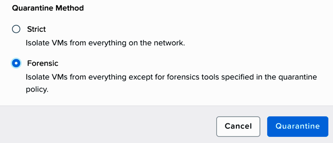
Select flow-abc-2 > Actions > Quarantine VMs. Select Forensic and click Quarantine.

../_images/select_forensic.png

What happens with the continuous ping between VMs 1 and 2?

Navigate to Explore > Security Policies > Quarantine.

Select Update in the top right corner then select + Add Source to the Quarantine policy.

Add a source by Subnet/IP with the IP address of flow-abc-1, a netmask of /32. Click on the plus sign ( + ) near Forensic category and allow any protocol on any port to the Forensic quarantine category.

What targets can this source be connected to?

What is the difference between the Forensic and Strict quarantine mode?

Select Next > Apply Now to save the policy.

What happens to the pings between flow-abc-1 and flow-abc-2 after the source is added?

Unquarantine flow-abc-2 by navigating to Explore > VMs > flow-abc-2 > Actions > Unquarantine VM.

Takeaways

  • In this exercise you utilized Flow to quarantine a VM in the environment using the two modalities of the quarantine policy, which are strict and forensic.
  • The forensic modality is key in allowing you to study the connection patterns into and out of a VM in order to establish which connections are allowed or denied while the VM is quarantined.